Climate Resolve
Product Designer
2025 - 2026
Figma Design
FigJam
1 PM
2 Designers
10 Developers

CONTEXT
What is Climate Resolve?
Climate Resolve is an LA-based environmental policymaking nonprofit, connecting communities with policymakers and helping other organizations secure environmental grants.
This year, I worked with Climate Resolve through USC Code the Change to design and build an internal tool for ~40 employees.
THE PROBLEM
Climate Resolve's internal management system currently lives throughout scattered spreadsheets
Climate Resolve uses multiple Google Sheets to manage everything across hour tracking, budgeting, and project staffing across the organization. As a result, information is scattered, and requires significant effort to navigate and manually update/oversee.
Employees at Climate Resolve often work across several projects at once.
Employees at Climate Resolve often work across several projects at once.
Each project has its own manager, budget, and hour allocation, making it challenging to understand how an employee’s time is distributed across the organization.
Employees at Climate Resolve often work across several projects at once.
Each project has its own manager, budget, and hour allocation, making it challenging to understand how an employee’s time is distributed across the organization.
How might we design a centralized platform that supports Climate Resolve's existing structure?
UniLease: a subleasing app for students, by students
UniLease is a subleasing marketplace for university students within the same institution. Users can login with their .edu email to verify student status, ensuring trust across subleasers and subletters alike.
Create a listing (Subleaser)
Add photos, pricing, and essential information in just a few steps. Your address is hidden from public by default for maximum security.
Explore and filter listings (Subletter)
Filters are based on what actually matter for college students: price, semester timelines, distance from campus, and level of privacy.
View details and express interest (Subletter)
Find essential details, such as estimated commute to campus and more. Reach out to express your interest.
Approve requests for messaging (Subleaser)
Find essential details, such as estimated commute to campus and more. Reach out to express your interest.
From user flow to initial structure

I started off by creating a user flow diagram to determine what pages the app should have. I also listing out important information that needs to be included in listings and filters.
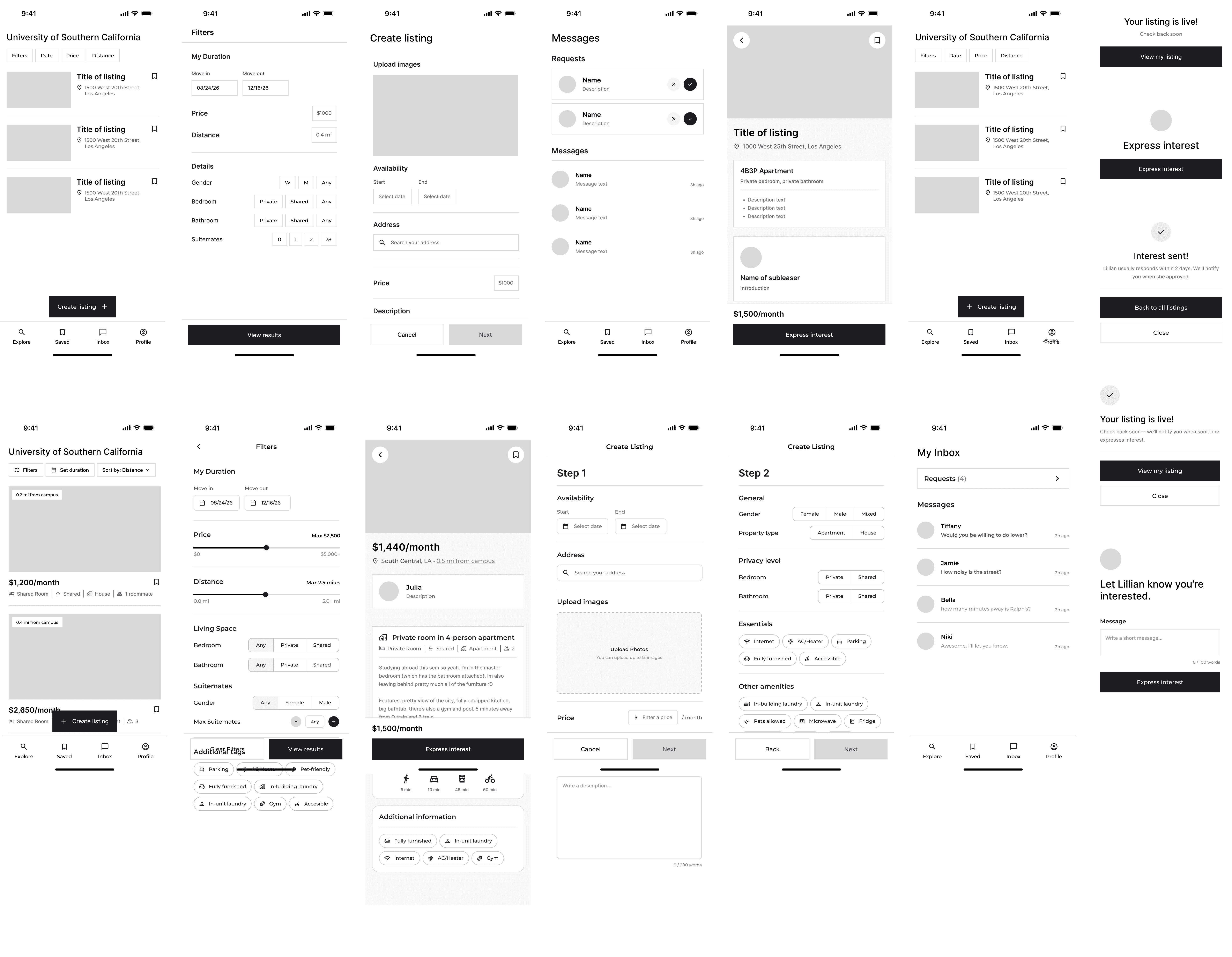
Then, I rapidly created low fidelity screens of the core flows. During this process, I iterated on the listing cards, condensed the listing creation process, and established the core features.
PROCESS
Breaking down a complex problem space through stakeholder interviews
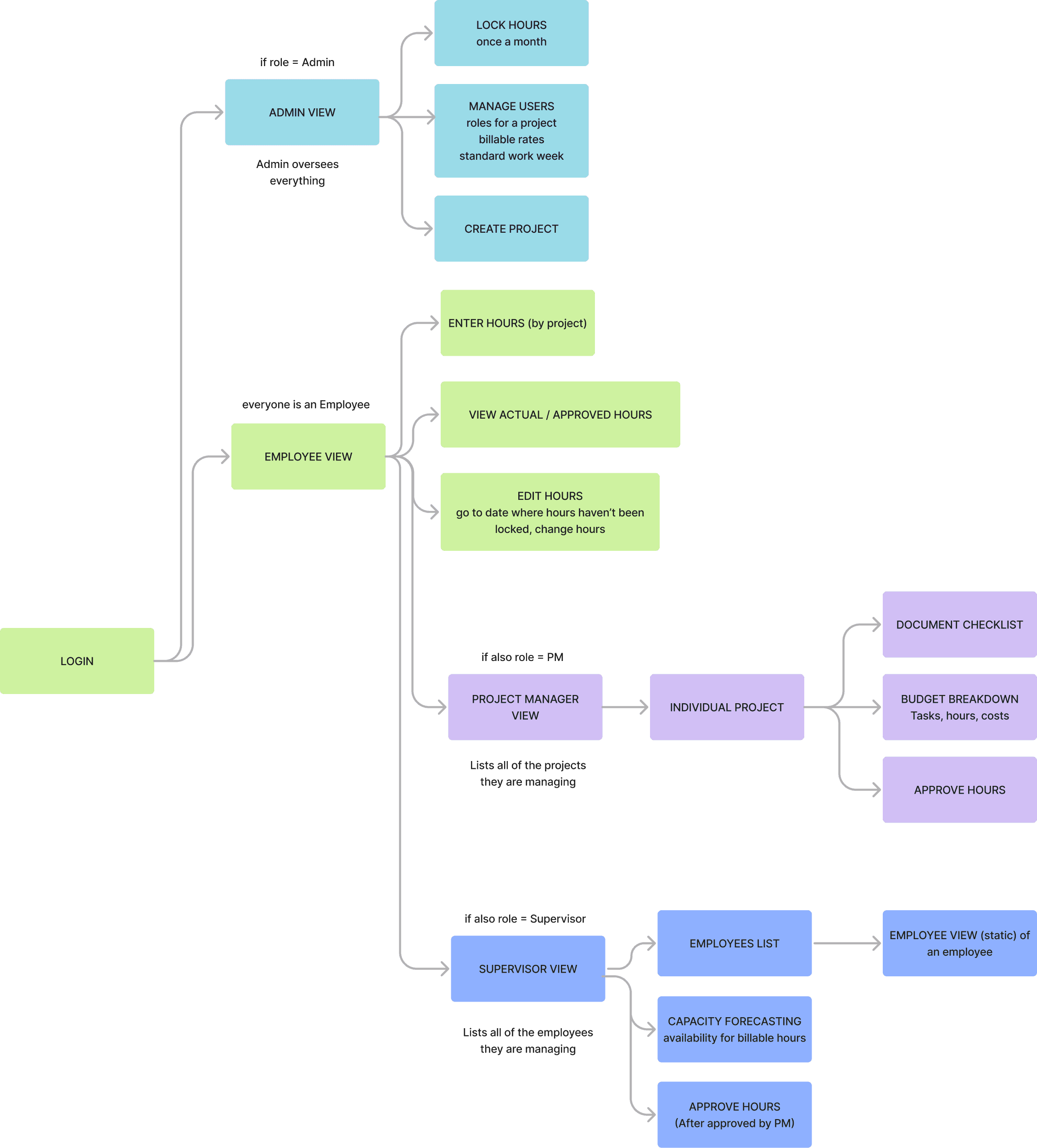
During the first semester, my co-designer and I met with Climate Resolve employees on a weekly basis, speaking directly with different roles to understand the organization's internal structure. This allowed us to develop a detailed sitemap. We broke down necessary features by role:
Administrator 👑
Not regular employees, only do admin-specific tasks. Should be able to manage/create/lock all people, hours, and projects.
Employee ⏰
Includes PMs, Supervisors, and regular employees alike. Should be able to input/track hours & complete project tasks.
PM or Supervisor 📝
Have access to pages that regular employee's don't. PMs manage a set of projects, while supervisors oversee a set of people. Both approve hours.
DESIGN DECISIONS
Maintaining the privacy of subleasers, while surfacing relevant information to subletters
A major concern that I hadn't considered was surfaced during the design process: Privacy. Subleasers may not want unwanted individuals from their school knowing exactly where they live, as it poses a serious safety risk. However, it is still essential for legitimately interested subletters to know the exact address.

Before: Full address is revealed to all users on listing, compromising security

After: Only reveal relevant information like neighborhood and distance from campus

After: Subletters can see the address if their interest request is approved
Creating an extra layer of trust
I added a photo, bio, and student verification badge on the profile card to build a sense of safety and connection between students.

At the top of individual listings, so subletters trust subleasers

Inside message requests, so subleasers trust subletters
Adding student-specific features


I added additional features surrounding university student's specific needs:
Commute time estimates is essential for students who might not have a car or a bike.
Semester timeline filtering is a quicker way to set dates based on the academic term rather than calendar dates.
DESIGN SYSTEM
Drawing visuals from popular apps trusted by college students


For the visual language of UniLeaser, I looked to apps that most college students already use, like Claude, Hinge, and Granola. I noticed that they pair serif type with warm tans and grays, and incorporated my inspirations into the color palette and typography.
OUTCOMES
Final prototype testing & feedback
75%
of testers reported an greater willingness to trust other users on UniLeaser than other platforms.
1.5/5
was the average difficulty score for creating a listing, 1 being extremely straightforward.
100%
of testers successfully navigated narrowing down the search using filters,
TAKEAWAYS
Design with a specific user group in mind.
Inputting the number of bedrooms and subleasing an entire home don't accurately reflect a college student's needs. Narrowing down the user group helped expose more pain points and generate new ideas.
Make connection feel human.
Digital interactions can sometimes feel impersonal, but paying attention to the design of small details can close that gap.